
Autoscaler & burst
Cloudburst Autoscaler calls POST /api/recommendations to pick the cheapest VM when bursting Kubernetes nodes.
Self-hosted · Open source
One place to ask “what’s the cheapest VM?” across multiple clouds. Send constraints — vCPU, RAM, arch, region, max price. Get cost-ranked recommendations in EUR. Optional TCO: include egress, storage, public IP, OS license. No provisioning. No lock-in.
One API call → ranked recommendations in EUR
/api/recommendations with vCPU, RAM, region$ curl -X POST \
"localhost:8000/api/recommendations" \
-H "Content-Type: application/json" \
-d '{"min_vcpu":2,"min_ram_gb":4,
"arch":"x86_64",
"region_constraint":"EU"}'→ 1. cx23 hetzner fsn1 €0.0048/hr score: 0.990
2. Standard_B2s azure west-eu €0.0400/hr score: 0.950One API, multiple clouds
Egress, storage, public IP in total cost
Legacy or multi-criteria; transparent explain block
AWS, GCP, Azure, Hetzner, Scaleway, DigitalOcean, OVH, Aruba, UpCloud, Open Telekom Cloud, Exoscale, IONOS, gridscale, STACKIT, Elastx, Cyso Cloud, Seeweb
Your data, no lock-in
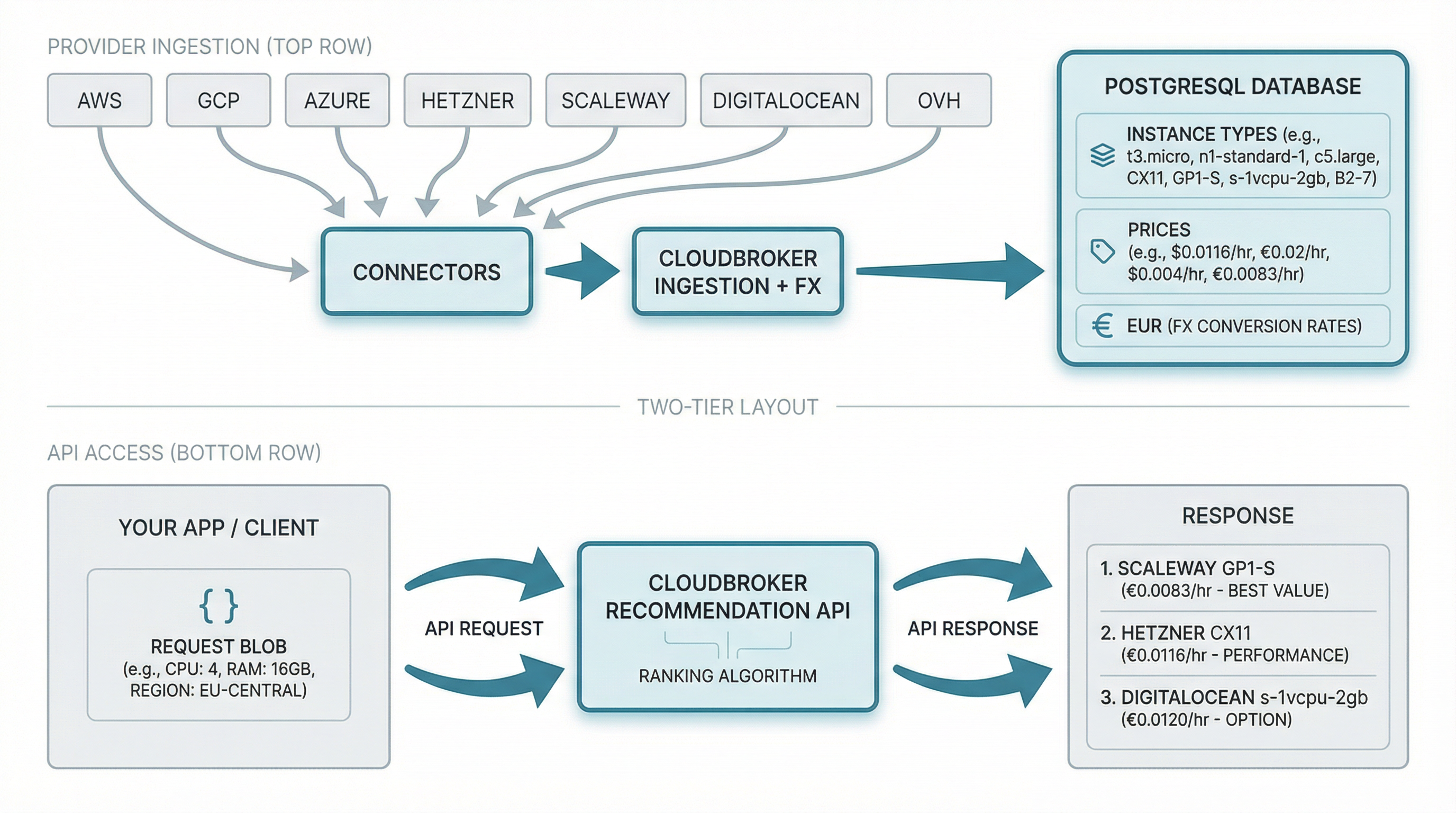
Send constraints — vCPU, RAM, region, max price. CloudBroker filters, scores, and returns a cost-ranked list. TCO params add egress, storage, and public IP to the total.
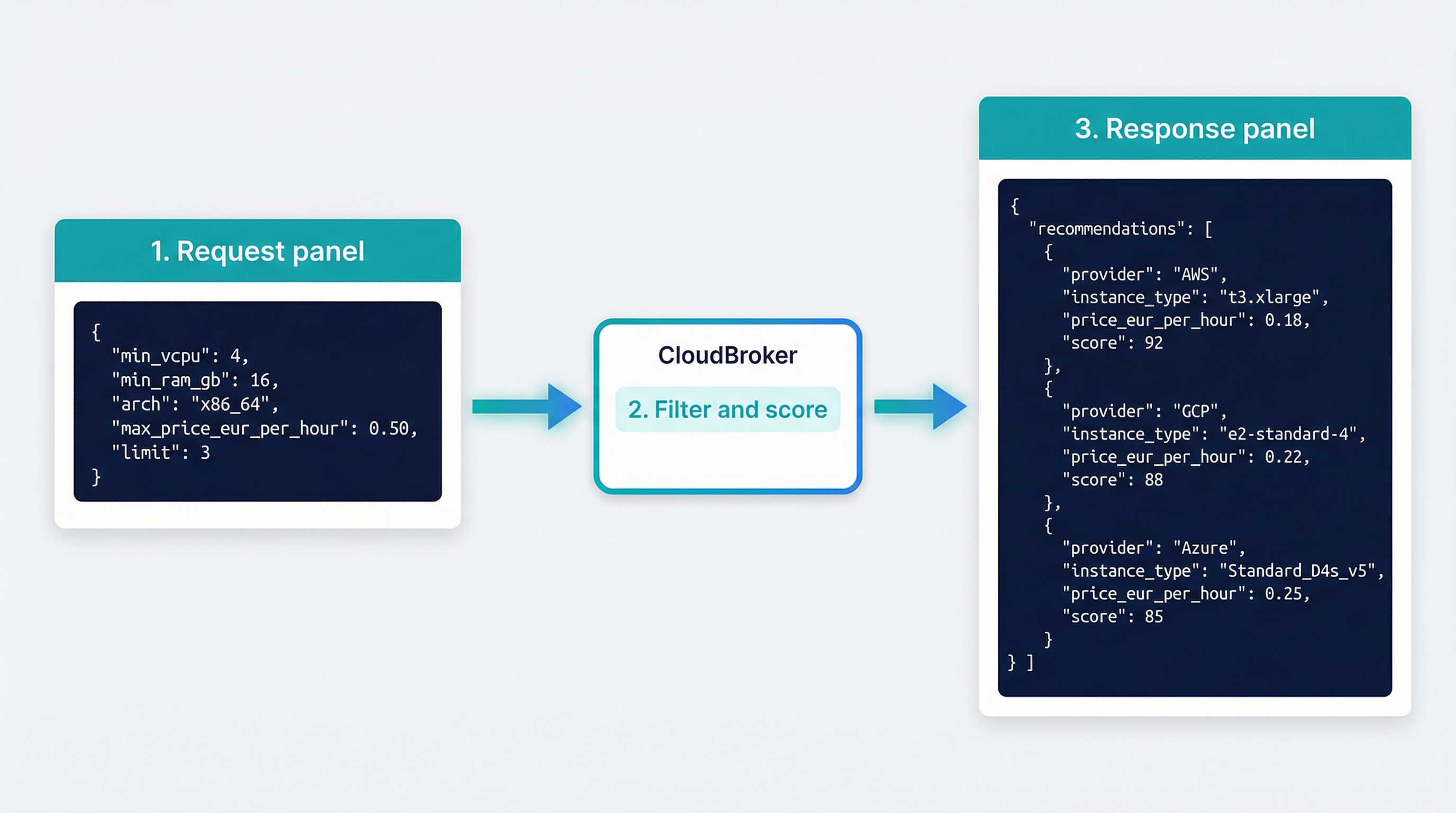
One endpoint. Send vCPU, RAM, arch, region, max price. Get a cost recommendation — the cheapest VM that fits. No provisioning, just the answer.
make up, make migrate, make ingest-all. make ingest-egress for TCO-aware recommendations. Hit /api/recommendations for your first cost recommendation. Done.
Your PostgreSQL. Your credentials. No lock-in. Cloudburst Autoscaler uses CloudBroker as its broker for compute when bursting Kubernetes nodes.
When CloudBroker fits best.
Cloudburst Autoscaler calls POST /api/recommendations to pick the cheapest VM when bursting Kubernetes nodes.
Compare instance prices across 17 cloud providers in one query. EUR-normalised.
With data source and egress estimates, get total cost including egress, storage, public IP, OS license.
"What's the cheapest 4 vCPU / 8 GB RAM in EU?" for capacity planning or migration decisions.
Track price changes and trends over time via /api/price-analytics.
Any script or controller can call the API; not limited to Cloudburst.
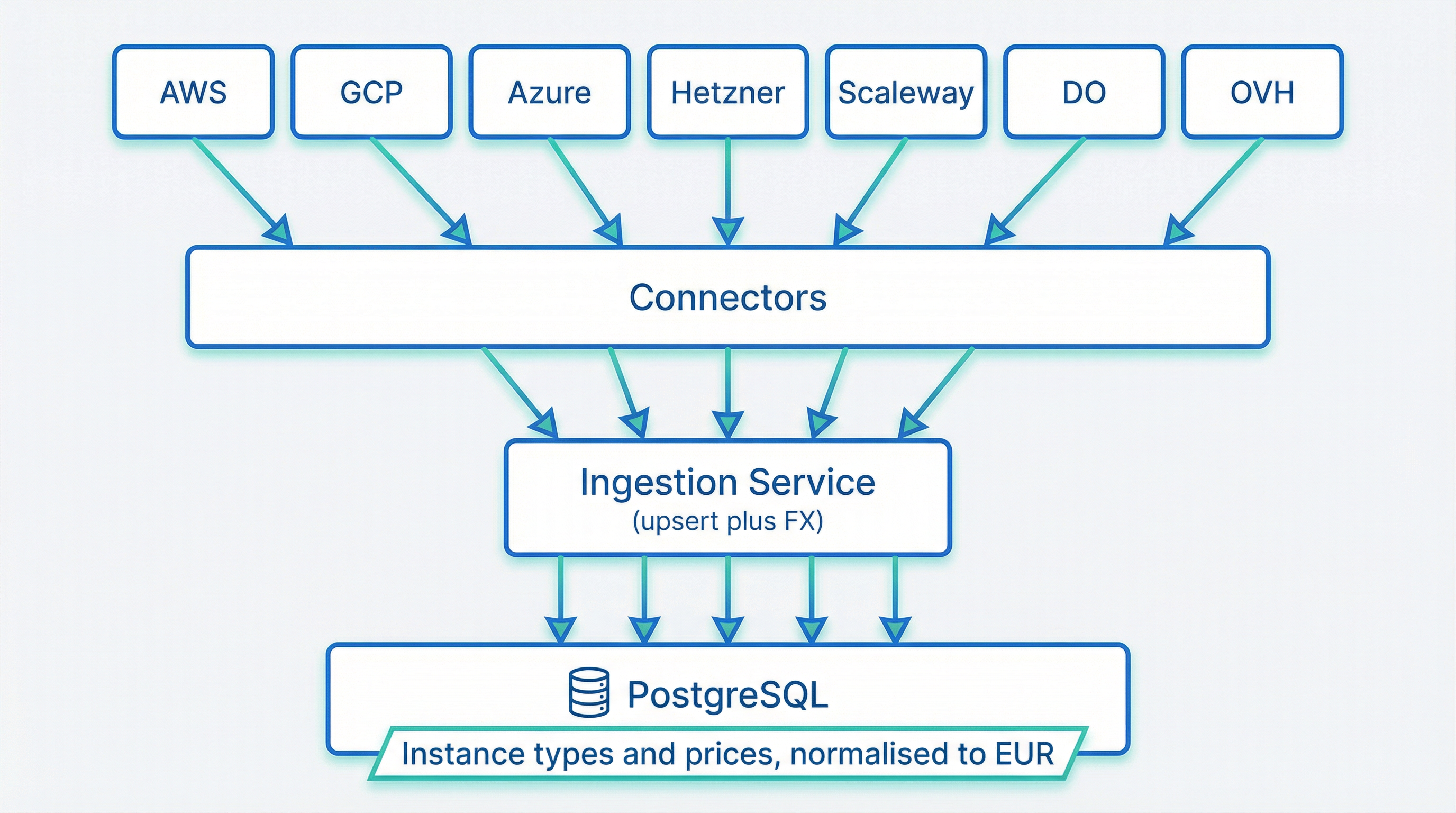
CloudBroker ingests compute pricing from each provider: instance types, regions, and prices. Connectors pull data, normalise to EUR, and upsert into one catalogue. Ingest once, query forever.
Pricing ingested via official APIs · Normalized to EUR
Pricing is fetched via each provider’s public or SDK APIs. Cost rates (egress, storage, public IP, OS license) — API for AWS/Azure/GCP; YAML config for Hetzner, DO, Scaleway, OVH. Run make ingest-egress or make ingest-all-costs.
How CloudBroker compares to other multi-cloud pricing tools.
| CloudBroker ✓ Recommended | Infracost | CloudPrice | Provider APIs | |
|---|---|---|---|---|
| Providers | —: — | 3: AWS, Azure, GCP | 3: AWS, Azure, GCP | 1 per API |
| Hosting | ✅ Self-hosted (you run it) | ❌ Hosted (SaaS, API key) | ❌ Hosted (SaaS) | You call provider directly |
| Recommendation | Ranked by cost + fit, one request | GraphQL query, Terraform-focused | Instance recommendations, regional comparison | Raw listings, no ranking |
| TCO | ✅ Egress, storage, public IP, OS license, cross-AZ in total cost | ❌ Per-provider or N/A | ❌ Per-provider or N/A | Per-provider or N/A |
| Currency | Normalised to EUR (FX) | Per-provider | Per-provider | Per-provider (USD, etc.) |
| Primary use | Autoscaler / burst cost selection (e.g. Cloudburst) | Terraform cost estimation | Pricing lookup, dashboards | Single-cloud billing / lookup |
CloudBroker targets self-hosted multi-cloud cost selection: 17 providers (including EU-focused Hetzner, Scaleway, OVH, Aruba, UpCloud, Open Telekom Cloud, Exoscale, IONOS, gridscale, STACKIT, Elastx, Cyso Cloud, Seeweb), one recommendation endpoint, EUR-normalised. Infracost and CloudPrice are hosted and focus on the big three; provider APIs are single-cloud. Choose based on your stack and who you want to run it.
The only self-hosted option with 17 providers, EUR normalization, and TCO support.
Four-part intro: problem and product, how it works, the API, scope and run.
Ingestion pipeline, data model, and cost recommendation engine. How the broker fits together.
Start the API and PostgreSQL, then call the recommendation endpoint. Request, response, and interactive docs.
CloudBroker is a self-hosted broker for compute instances. It ingests instance types and hourly prices from multiple cloud providers, normalizes them to EUR, and exposes a cost recommendation endpoint. You ask once; it answers across all of them. Send constraints (vCPU, RAM, arch, region, max price); get a cost-ranked list. TCO-aware: include egress, storage, public IP, OS license in total cost when you provide placement context. No provisioning — it only recommends “what’s the cheapest VM that fits?”
No. It only returns cost recommendations. Used by Cloudburst Autoscaler for cost-aware Kubernetes burst; any script or controller can call it.
It’s open source. You run it. Your PostgreSQL, your credentials. No monthly fee to us.
Clone the repo, make up, make migrate, make ingest-all. For TCO-aware recommendations, also run make ingest-egress. Then hit POST /api/recommendations. See the repo for provider credentials in .env.
Yes. New providers can be added via a connector in the ingest pipeline. Requirements:
Contributions are welcome. Open an issue or PR on GitHub to propose a new provider.
Used by Cloudburst Autoscaler: when a Kubernetes pod can’t be scheduled, Cloudburst uses CloudBroker as its broker for compute — gets a cost recommendation, then provisions the recommended VM.
— Cloud Providers · Self-Hosted · Open Source · EUR-Normalized · TCO-Aware